Robertshaw 9415 User Installation Manual
Application
The Robertshaw 9415 is a multi-stage thermostat designed to control 24 VAC gas or electric two-stage heating and two-stage cooling systems.
Features
- Summer and winter setpoints
- Large back lit display
- Adjustable 1st stage temperature differential: .5°F to 3.0°F (0.5°C to 1.5°C)
- Adjustable 2nd stage temperature differential: 1° to 6°F (.5°-3°C)
- Compressor short cycle protection
- Accuracy within ±1°
- Zone system compatible as a master thermostat
- Permanent memory retention
- Fahrenheit/Celsius display option
- Adjustable from 45°F to 90°F (7°C - 32°C)
- Quick wire terminal block
- Automatic heating shutdown if temperature exceeds 94°F (34°C)
IMPORTANT SAFETY INFORMATION WARNING:
- Always turn off power at main fuse or circuit breaker panel before installing, removing, cleaning, or servicing thermostat.
- Read all the information in this manual before installing this thermostat.
- This is a 24 VAC low-voltage thermostat. Do not install on voltages higher than 30 VAC.
- All wiring must conform to local and national building and electrical codes and ordinances.
- Do not short (jumper) across terminals on the gas valve or at the system control to test installation. This will damage the thermostat and void the warranty.
- Do not connect ground to any terminal in this unit.
Step 1: Replacing Existing Thermostat
- Turn off power to heating and cooling system.
- Remove cover from old thermostat to expose wires (Figure 1).

- Disconnect wires one at a time from existing terminals. Use enclosed labelsto mark existing wires. Refer to cross references in Table 1 if existing wiring does not directly match the labels.
- Remove existing thermostat base from wall.
|
Old Terminal |
New Label |
Description |
|
R, V-VR or VR-R |
R |
24 VAC, Return |
|
Y, Y1 or M |
Y1 |
1st Stage Cooling Circuit |
|
O or R |
O |
Cool Active Accessory Terminal |
|
B |
B |
Heat Active Accessory Terminal |
|
F or G |
G |
Fan Control Relay |
|
Y2 |
Y2 |
2nd Stage Cooling Circuit |
|
W2 or W-U |
W2 |
2nd Stage Heating Control |
|
C, X or B |
C |
24 VAC, Transformer Common Side |
|
W1 or W |
W1 |
1st Stage Heating Circuit |
NOTE: THIS THERMOSTAT REQUIRES A 24V COMMON WIRE FOR PROPER OPERATION. Table 1
Recycling Thermostat
If this thermostat is replacing a thermostat that contains mercury in a sealed tube, do not place your old thermostat in the garbage. Contact your local waste management authority for instructions regarding proper disposal of the thermostat.
Step 2: Installing Model 9415 Thermostat
NOTE: FOR NEW INSTALLATIONS, MOUNT THERMOSTAT ON INSIDE WALL, FIVE FEET ABOVE THE FLOOR. DO NOT INSTALL BEHIND A DOOR, IN A CORNER, NEAR AIR VENTS, IN DIRECT SUNLIGHT, OR NEAR ANY HEAT OR STEAM GENERATING FIXTURES. INSTALLATION AT THESE LOCATIONS WILL AFFECT THERMOSTAT OPERATION.
- Turn power off to the heating and cooling systems.
- Place HEAT-OFF-COOL in OFF position (Figure 2).
- Place -ON-AUTO switch into AUTO position (Figure 2).
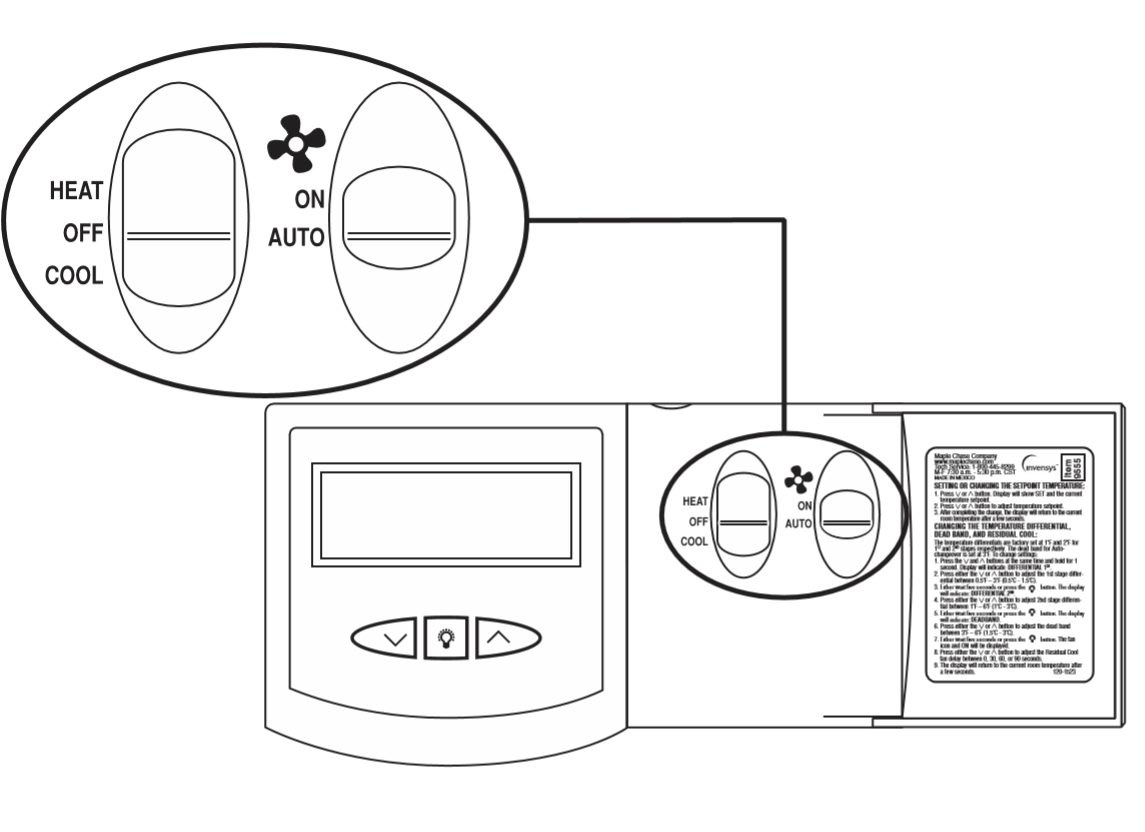
- Remove the cover using a coin or screwdriver (Figure 3). Set aside.

- Place thermostat against the wall at desired location. Make sure wireswill feed through opening(Figure 4) on base of thermostat.
- Mark placement of mounting holes (Figure 4). Set base aside.

- If mounting on drywall, tap plastic anchors into wall. NOTE: ENCLOSED PLASTIC ANCHORS DO NOT REQUIRE A DRILLED HOLE FOR DRYWALL.
- If mounting on a surface other than drywall, drill the marked holesusing a 3/16" drill bit.
- Align base with plastic anchors and feed wires through opening.
- Secure base to wall with supplied screws. NOTE: THE THERMOSTAT WILL MOUNT HORIZONTALLY ON A SINGLE GANG JUNCTION BOX.
- Strip end of wires 5/16” if needed.
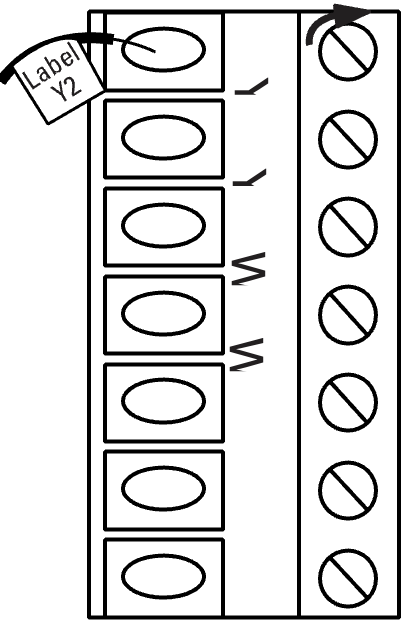
- Terminal screws are already loose and ready for wire insertion.Insert wires into terminal strip (Figure 5) matching the label to the corresponding terminal (see Wiring Diagrams). Tighten screws.
- Make sure wire connections are secure.14. Push excess wire back through opening.
- Wiring Diagrams
TERMINAL LEGEND - 9415
TERM
EQUIPMENT TO CONNECT
REQ?
TERMINAL FUNCTION
C
24VAC common connection
Yes
For input of 24VAC common side of transformer
R
24VAC hot connection
Yes
For input of 24VAC hot side of transformer
Y2
Second stage cooling connection
No
Energizes on a call for second stage cooling (aux.)
Y1
First stage compressor connection
Yes*
Energizes on a call for first stage of cooling
W1
First stage heat connection
Yes*
Energizes on a call for first stage of heating
W2
Second stage heat connection
No
Energizes on a call for second stage heating (aux.)
G
Indoor fan connection
Yes
Energizes with W1, W2, Y1 and Y2 terminals or with
FAN option switched to the ON position
O
Accessory**
No
Energizes when in the in COOL mode
B
Accessory**
No
Energizes when in the HEAT or EM modes
* This thermostat can be used as a heat only or cool only thermostat therefore it is not always necessary to use both W1 and Y1.
** The O and B terminals are accessory terminals that typically are used for zoning applications.
- Wiring Diagrams
- Set the GAS/ELEC switch to either GAS for a gas/oil heating system or ELEC for an electric heating system (Figure 6).
- Replace thermostat cover by snapping into place.
- Turn on power to system. Test thermostat as described in the following section.
Readmore and Download Robertshaw 9415 User Installation Manual
| Title | : Robertshaw 9415 User Installation Manual |
| Format | |
| Pages | : 12 Pages |
| Language | : English |
| File Size | : 1 MB |