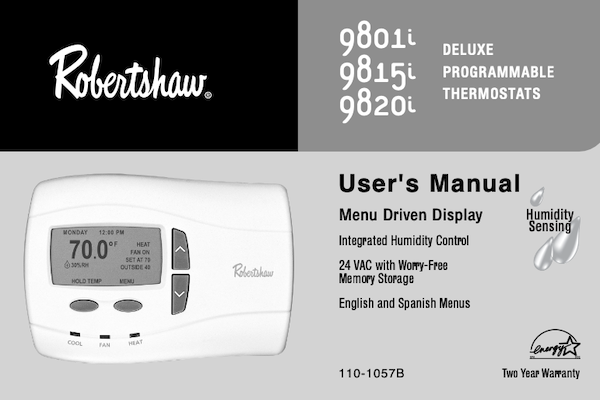
Robertshaw 9801i, 9815i, 9820i Delux Programmable Thermostat User Manual
IMPORTANT SAFETY INFORMATION
WARNING:
- Always turn off power at the main power source by unscrewing fuse or switching circuit breaker to the off position before installing, removing, or cleaning this thermostat.
- Read all of the information in this manual before programming this thermostat.
- This is a 24V AC low-voltage thermostat. Do not install on voltages higher than 30V AC.
- All wiring must conform to local and national building and electrical codes and ordinances.
- Do not short (jumper) across terminals on the gas valve or at the system control to test installation. This will damage the thermostat and void the warranty.
- This thermostat is equipped with automatic compressor protection to prevent potential damage due to short cycling or extended power outages. The short cycle protection provides a 5-minute delay between heating or cooling cycles to prevent the compressor from being damaged.
- Do not switch system to cool if the temperature is below 50°F (10°C). This can damage the cooling system and may cause personal injury.
- Use this thermostat only as described in this manual.
TABLE OF CONTENTS
How do I change the time of day and day of the week? . . . . . . . . . . . . . . . . . . . . . . . . . . . . . . . . . . . . . . . . . . . . . . . . . . . . . . . . . . . . . .Page 4
How do I turn on the heating or cooling cycles? . . . . . . . . . . . . . . . . . . . . . . . . . . . . . . . . . . . . . . . . . . . . . . . . . . . . . . . . . . . . . . . . . . . .Page 5
What do the LED’s below the display mean? . . . . . . . . . . . . . . . . . . . . . . . . . . . . . . . . . . . . . . . . . . . . . . . . . . . . . . . . . . . . . . . . . . . . . .Page 6
How do I cycle the fan? . . . . . . . . . . . . . . . . . . . . . . . . . . . . . . . . . . . . . . . . . . . . . . . . . . . . . . . . . . . . . . . . . . . . . . . . . . . . . . . . . . . . . .Page 7
How does INTERMITTENT FAN work? . . . . . . . . . . . . . . . . . . . . . . . . . . . . . . . . . . . . . . . . . . . . . . . . . . . . . . . . . . . . . . . . . . . . . . . . . .Page 7
How do I temporarily change the temperature? . . . . . . . . . . . . . . . . . . . . . . . . . . . . . . . . . . . . . . . . . . . . . . . . . . . . . . . . . . . . . . . . . . . .Page 8
Can I set a temporary adjustment for longer than 3 hours? . . . . . . . . . . . . . . . . . . . . . . . . . . . . . . . . . . . . . . . . . . . . . . . . . . . . . . . . . . .Page 9
Can I set the thermostat to hold one temperature indefinitely? . . . . . . . . . . . . . . . . . . . . . . . . . . . . . . . . . . . . . . . . . . . . . . . . . . . . . . . .Page 10
How do I return to the Program Mode after being in HOLD? . . . . . . . . . . . . . . . . . . . . . . . . . . . . . . . . . . . . . . . . . . . . . . . . . . . . . . . . . .Page 10
How do I set the Vacation Mode? . . . . . . . . . . . . . . . . . . . . . . . . . . . . . . . . . . . . . . . . . . . . . . . . . . . . . . . . . . . . . . . . . . . . . . . . . . . . . . .Page 11
How do I program my thermostat? . . . . . . . . . . . . . . . . . . . . . . . . . . . . . . . . . . . . . . . . . . . . . . . . . . . . . . . . . . . . . . . . . . . . . . . . . . . . . .Page 12
How do I copy one day’s program to another day? . . . . . . . . . . . . . . . . . . . . . . . . . . . . . . . . . . . . . . . . . . . . . . . . . . . . . . . . . . . . .. . . . .Page 14
What is an event? . . . . . . . . . . . . . . . . . . . . . . . . . . . . . . . . . . . . . . . . . . . . . . . . . . . . . . . . . . . . . . . . . . . . . . . . . . . . . . . . . . . . . . . . . . .Page 15
How do I know what program is right for me? . . . . . . . . . . . . . . . . . . . . . . . . . . . . . . . . . . . . . . . . . . . . . . . . . . . . . . . . . . . . . . . . . . . . . .Page 15
How do I set the Humidity Levels? . . . . . . . . . . . . . . . . . . . . . . . . . . . . . . . . . . . . . . . . . . . . . . . . . . . . . . . . . . . . . . . . . . . . . . . . . . . . . .Page 16
What is the difference between Manual and Auto modes? . . . . . . . . . . . . . . . . . . . . . . . . . . . . . . . . . . . . . . . . . . . . . . . . . . . . . . . . . . . .Page 16
What happens if the mode is set to OFF? . . . . . . . . . . . . . . . . . . . . . . . . . . . . . . . . . . . . . . . . . . . . . . . . . . . . . . . . . . . . . . . . . . . . . . . . .Page 16
What are the USER settings? . . . . . . . . . . . . . . . . . . . . . . . . . . . . . . . . . . . . . . . . . . . . . . . . . . . . . . . . . . . . . . . . . . . . . . . . . .. . . . . . . . .Page 17
Detailed Information on the USER SETTINGS (Or what do these USER SETTINGS do?) . . . . . . . . . . . . . . . . . . . . . . . . . .. . . . . . . . . .Page 18
When would I need to change the USER settings? . . . . . . . . . . . . . . . . . . . . . . . . . . . . . . . . . . . . . . . . . . . . . . . . . . . . . . . . . . . . . . . . . .Page 20
What are the INSTALLER settings? . . . . . . . . . . . . . . . . . . . . . . . . . . . . . . . . . . . . . . . . . . . . . . . . . . . . . . . . . . . . . . . . . . . . . . . . . . . . . .Page 21
When would I need to change the INSTALLER settings? . . . . . . . . . . . . . . . . . . . . . . . . . . . . . . . . . . . . . . . . . . . . . . . . . . . . . . . . . . . . . .Page 24
How does Energy Efficient Recovery™ (EER™) work? . . . . . . . . . . . . . . . . . . . . . . . . . . . . . . . . . . . . . . . . . . . . . . . . . . . . . . . . . . . . . . .Page 25
How does my remote indoor sensor work? . . . . . . . . . . . . . . . . . . . . . . . . . . . . . . . . . . . . . . . . . . . . . . . . . . . . . . . . . . . . . . . . . . . . . . . . .Page 25
When would I need a remote indoor sensor? . . . . . . . . . . . . . . . . . . . . . . . . . . . . . . . . . . . . . . . . . . . . . . . . . . . . . . . . . . . . . . . . . . . . . . . .Page 25
How does my remote outdoor sensor work? . . . . . . . . . . . . . . . . . . . . . . . . . . . . . . . . . . . . . . . . . . . . . . . . . . . . . . . . . . . . . . . . . . . . . . . .Page 25
Where should I install a remote outdoor sensor? . . . . . . . . . . . . . . . . . . . . . . . . . . . . . . . . . . . . . . . . . . . . . . . . . . . . . . . . . . . . . . . . . . . .Page 25
Who should I call for additional help? . . . . . . . . . . . . . . . . . . . . . . . . . . . . . . . . . . . . . . . . . . . . . . . . . . . . . . . . . . . . . . . . . . . . . . . . . . . . . .Page 26
What should I do if my power goes out? . . . . . . . . . . . . . . . . . . . . . . . . . . . . . . . . . . . . . . . . . . . . . . . . . . . . . . . . . . . . . . . . . . . . . . . . . . .Page 26
How do I reset the thermostat program to factory conditions? . . . . . . . . . . . . . . . . . . . . . . . . . . . . . . . . . . . . . . . . . . . . . . . . . . . . . . . . . . .Page 26
How do I know if the heating or cooling is on? . . . . . . . . . . . . . . . . . . . . . . . . . . . . . . . . . . . . . . . . . . . . . . . . . . . . . . . . . . . . . . . . . . . . . .Page 26
My energy bills are too high. Is there anything I can do? . . . . . . . . . . . . . . . . . . . . . . . . . . . . . . . . . . . . . . . . . . . . . . . . . . . . . . . . . . . . . . .Page 27
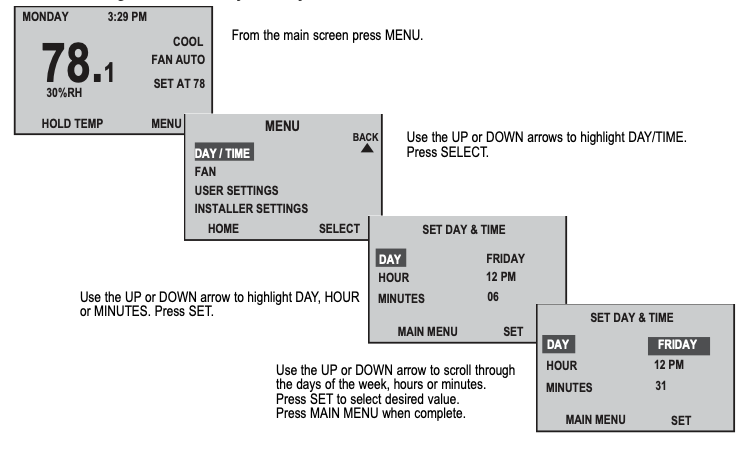
How do I change the time of day and day of the week?
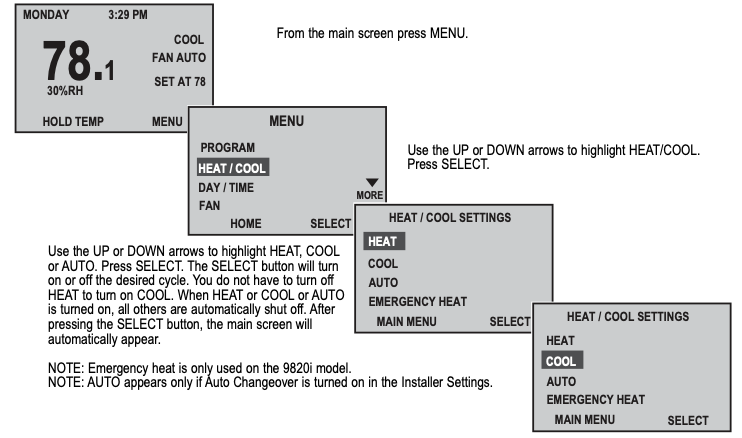
How do I turn on the heating or cooling cycles?
What do the LED’s below the display mean?
- The LED’s indicate when the HVAC system is activated. With a call for heating or cooling, the HEAT or COOL LED will be illuminated.
- THE AUX LED indicates the second stage of heating or cooling.
- The CHECK LED is used only on the 9820i. It indicates the heat pump should be serviced by a qualified technician.
- The EMER LED indicates that the emergency heat is turned on.
How do I cycle the fan?
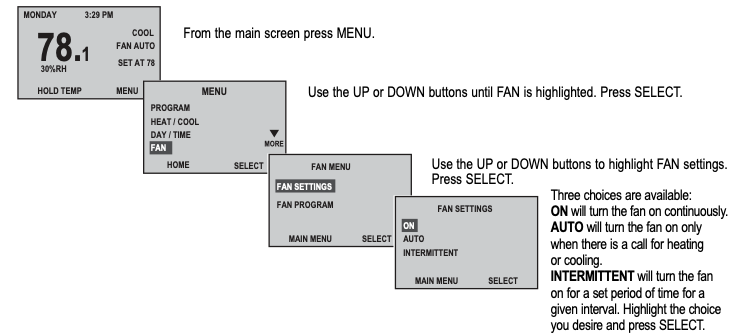
How does INTERMITTENT FAN work?
INTERMITTENT will turn the fan on for a set period of time for a given interval.
The thermostat will cycle the fan on for the set ON cycle. The fan will remain off for the set OFF cycle.
If the HVAC system runs for a longer period than the ON cycle, the OFF cycle will start counting over again when the system shuts off.
Readmore and Download Robertshaw 9801i, 9815i, 9820i Delux Programmable Thermostat User Manual
| Title | : Robertshaw 9801i, 9815i, 9820i Delux Programmable Thermostat User Manual |
| Format | |
| Pages | : 28 Pages |
| Language | : English |
| File Size | : 500KB |