Robertshaw 9515 DIGITAL NON-PROGRAMMABLE Thermostat 2Heat / 2Cool User Installation Manual
IMPORTANT SAFETY INFORMATION
WARNING:
- turn off power at the main power source by unscrewing fuse or switching circuit breaker to the off position before installing, removing, cleaning or servicing thermostat.
- gramming this thermostat.
- higher than 30V AC.
- codes and ordinances.
- not short (jumper) across terminals on the gas valve or at the system control to test installation. This will damage the thermostat and void the warranty.
Features
- Multi stage heating and cooling control
- Zone system compatible as a master thermostat
- Auxiliary heat
- Fahrenheit/Celsius display option
- Adjustable from 45°F (7°C) to 90°F (32°C)
- Accuracy within ± 1 degree
- Adjustable 1st stage temperature differential: 1°-3°, 2nd stage temperature differential: 2°-6° F
- Automatic heating shutdown if temperature exceeds 90°F (32°C)
- Battery free memory storage
Replacing Existing Thermostat
- Turn off power to heating and cooling system.
- Remove cover of old thermostat to expose wires. Do not disconnect wires (Figure 1).
- Label wires per Table 1.
Features
- Multi stage heating and cooling control
- Zone system compatible as a master thermostat
- Auxiliary heat
- Fahrenheit/Celsius display option
- Adjustable from 45°F (7°C) to 90°F (32°C)
- Accuracy within ± 1 degree
- Adjustable 1st stage temperature differential: 1°-3°,
2nd stage temperature differential: 2°-6° F
- Automatic heating shutdown if temperature exceeds 90°F (32°C)
- Battery free memory storage
Replacing Existing Thermostat
- Turn off power to heating and cooling system.
- Remove cover of old thermostat to expose wires. Do not disconnect wires (Figure 1).
- Label wires per Table 1.
- Table 1.
-
Old Label
New Label
Description
R, V-VR or VR-R
R
24 VAC, Return
Y, Y1 or M
Y1
1st Stage Cooling Circuit
O or R
O
Reversing Valve,
(Cooling Mode)
B
B
Reversing Valve
(Heating Mode)
F or G
G
Fan Control Relay
Y2
Y2
2nd Stage Cooling Circuit
W2 or W-U
W2
2nd Stage Heating Control
C, X or B
C
24 VAC, Transformer Common Side
W1 or W
W1
1st Stage Heating Circuit
-
- Table 1.
- After labeling wires, remove wires from terminals.
- Remove existing thermostat base from wall.
- Refer to the following section for instructions on how to install thermostat.

Installing Model 9515 Thermostat
NOTE: FOR NEW INSTALLATIONS, MOUNT THERMOSTAT ON INSIDE WALL, 5 FEET ABOVE THE FLOOR. DO NOT INSTALL BEHIND A DOOR, IN A CORNER, NEAR AIR VENTS, IN DIRECT SUNLIGHT, OR NEAR ANY HEAT OR STEAM GENERATING FIXTURES. INSTALLATION AT THESE PLACES WILL AFFECT THERMOSTAT OPERATION.
- Turn power off to the heating and cooling systems.
- Place COOL-OFF-HEAT in OFF position.

-
Place AUTO-ON switch into AUTO position.
-
Remove the cover using a coin or screwdriver (Figure 2).
.png)
-
Place thermostat against the wall at desired location. Make sure wires will feed through opening on base of thermostat.
-
Mark placement of mounting holes (Figure 3). Set base aside.

-
Drill the marked holes using a 3/16" drill bit. NOTE: Enclosed plastic anchors do not require a drilled hole for drywall.
-
Tap plastic anchors into the wall.
-
Align base with plastic anchors and feed wires through opening.
-
Secure base to wall with supplied screws.
-
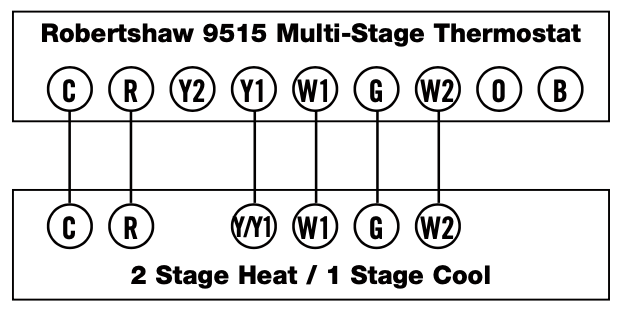
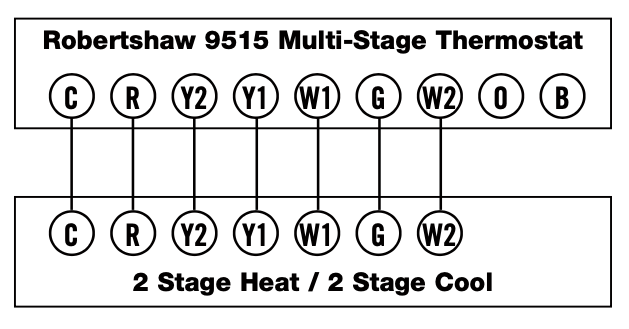
Connect wires to terminal strip (refer to wiring diagrams). Make sure wire connections are secure.
-
Set the °F/°C switch to either °F for Fahrenheit display or °C for Celsius display readout (Figure 4).

-
Set the GAS/ELEC switch to either GAS for a gas/oil heating system or ELEC for an electric heating system.
-
Replace cover onto thermostat by snapping into place.
-
Turn on power to system. Test thermostat as described in the following section.
Operation
Setting or Changing the Setpoint Temperature
- Press either the UP or Down button. The display will show the current temperature setpoint.

-
Press either the UP or Down button to adjust the temperature setting either up or down.
The display will return to the room temperature display five seconds after the last input and the new setpoint will be saved.
Changing Temperature Differential
IMPORTANT: The temperature differential is factory set at 1 (1°). This means that whenever the room temperature changes by one degree Fahrenheit from the temperature setting, the system will turn on. If the system turns on too often, increase the temperature differential.
-
Press both UP or Down buttons at the same time and hold for one second.

-
Press either the UP or Down button to adjust the 1st stage temperature differential up or down.
-
After 5 seconds DIFF will begin to flash on the display indicating 2nd stage differential value.
-
Press either the UP or Down button to adjust the 2nd stage temperature differential up or down. The display will return to the room temperature five seconds after the last input.
To Test Thermostat
WARNING: DO NOT SHORT (JUMPER) ACROSS TERMINALS OF GAS VALVE OR SYSTEM CONTROL TO TEST OPERATION. THIS WILL DAMAGE THE THERMOSTAT AND VOID YOUR WARRANTY.
CAUTION: DO NOT SWITCH SYSTEM TO COOL IF THE TEMPERATURE IS BELOW 50°F (10°C). THIS CAN DAMAGE THE AIR CONDITIONING SYSTEM AND CAUSE PERSONAL INJURY.
- Place the COOL-OFF-HEAT switch into the COOL position.
- Press the Down button until the temperature setting is at least 3 degrees below the room temperature. The air conditioning system should turn on within a few seconds. NOTE: When in the COOL mode once the thermostat turns off, a built in 5- minute delay prevents the system from turning on again. This protects the compressor. No additional time delay relay is required. To override the 5- minute delay for installation, press the RESET button.
-
Put the COOL-OFF-HEAT switch into the OFF position. The air conditioning system should turn off.
-
Put the COOL-OFF-HEAT switch into the HEAT position.
-
Press the Up button until the temperature setting is at least 3 degrees above room temperature. The heating system should turn on. The fan may not turn on immediately, depending upon the fan delay built into the furnace.
-
Put the COOL-OFF-HEAT switch into the OFF position. The heating system should turn off. The fan may continue to run for a short period of time.
-
Put the AUTO-ON switch to the ON position. The blower fan should turn on.
-
Put the AUTO-ON switch to the AUTO position. The blower fan should turn off.
Changing Fahrenheit (F) to Celsius (C)
The thermostat is preset to display the temperature in degrees Fahrenheit. You may change the display readout to Celsius if desired.
- Move the manual switch marked F (Fahrenheit) and C (Celsius) locat- ed at the center of the circuit board to the desired setting (page 5).
- Press RESET button located to the right of the LCD display to register the change. The display will change to show the temperature in your desired temperature scale. To return the thermostat to its original setting, repeat steps 1 and 2 above.
Note: Pressing the RESET button resets the 1st and 2nd stage differential to factory preset conditions.
LED Indicator
The LED indicator illuminates during a call for second stage heating or cooling. The auxiliary stages are used to maintain comfort during extremes in weather conditions. If the LED is illuminated too frequently during periods of moderate temperature, check the differential settings (page 6).
Wiring Diagrams
The following is just a sample of the most common types of HVAC systems. Refer to your system’s installation manual for wiring information.
Troubleshooting
|
Thermostat does not turn on system. |
Check wiring. (See INSTALLATION) Check fuse. Replace with 2 amp fuse if fuse has opened. |
|
Thermostat turns on and off too frequently. |
Increase temperature differential. (See DIFFERENTIAL) |
|
System fan does not operate properly. |
Move fan option switch to either gas or electric, to match system. (See INSTALLATION) |
|
Thermostat does not display proper room temperature. |
Check F Fahrenheit/C Celsius switch located at top center of cir- cuit board for proper position. If a new selection is made, press RESET button located directly below LCD display. |
Readmore and Download Robertshaw 9515 DIGITAL NON-PROGRAMMABLE Thermostat 2Heat / 2Cool User Installation Manual
| Title | : Robertshaw 9515 DIGITAL NON-PROGRAMMABLE Thermostat 2Heat / 2Cool User Installation Manual |
| Format | |
| Pages | : 11 Pages |
| Language | : English |
| File Size | : 1 MB |
