White Rodgers 1E78-144 Installation Manual
YOUR THERMOSTAT REPLACES
|
Typical System Compatibility Chart |
1E78 |
|
Standard Heat Only Two Wire Gas or Oil Fired Systems (24 volt) |
Yes |
|
Electronic Ignition Heat Only Two Wire Systems (24 volt) |
Yes |
|
Electronic Ignition Heat Only Gas or Oil Fired Systems (24 volt) |
Yes |
|
Standard Heat/Cool Systems (24 volt) |
Yes |
|
Heat/Cool Systems Electric Heat (24 volt) |
Yes |
|
Heat Only Electric Heat Systems (24 volt) |
Yes |
|
Cool Only Systems (24 volt) |
Yes |
|
Heat Pump Systems (No Aux. or Emergency Heat) |
Yes |
|
Hot Water Zone Heat Only (Two Wire) Systems |
Yes |
|
Hot Water Zone Heat Only (Three Wire) Systems |
No |
|
Line Voltage Heating or Baseboard 110/240 Volt Systems |
No |
|
Millivolt Systems Floor or Wall Furnaces |
Yes |
|
VDC Mobile Home Application |
Yes |
|
Multistage Systems |
No |
|
Systems Exceeding 30VAC, 1.5 Amp |
No |
White Rodgers 1E78-144 MOUNTING AND WIRING
Electric Heat or Single-Stage Heat Pump Systems
This thermostat is configured from the factory to operate a heat/cool, fossil fuel (gas, oil, etc.), forced air system. It is configured correctly for any system that DOES NOT require the thermostat to energize the fan on a call for heat. If your system is an electric or heat-pump system that REQUIRES the thermostat to turn on the fan on a call for heat, locate the GAS/ELECTRIC switch (see fig. 1) and switch it to the ELECTRIC position. This will allow the thermostat to energize the fan immediately on a call for heat. If you are unsure if the heating/ cooling system requires the thermostat to control the fan, contact a qualified heating and air conditioning service person.
Hydronic (Hot Water or Steam) Heating Systems
This thermostat is set to operate properly with a forced-air heating system. If you have a hydronic heating system (a system that heats with hot water or steam), you must set the thermostat to operate properly with your system. The factory default setting is forced air heat. Clipping jumper W905 on the circuit board will produce a longer heating cycle which is normally for hot water or steam (hydronic) systems. Both settings produce a very accurate temperature control and can be set to your personal preference. As received, the thermostat cycles the system just under 1˚F. With W905 clipped, the system cycles at approximately 1.5˚F.
Energy Management Recovery (EMR)
This thermostat is set to operate with EMR. This causes the thermostat to start the heating or cooling system early to have the room temperature reach the program setpoint at the time the period is to start. To disable EMR, clip jumper W903 (see Fig. 1). Attach Thermostat Base to Wall
- Remove the packing material from the thermostat. Gently pull the thermostat body straight off the base. Forcing or prying on the thermostat will cause damage to the unit. If necessary, move the electric heat switch (see ELECTRIC HEAT SYSTEMS, above).
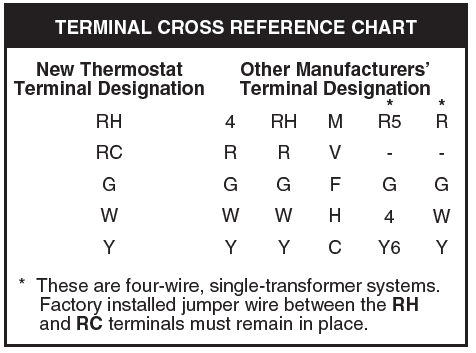
- Connect wires beneath terminal screws on base using appropriate wiring schematic (see figs. 2 through 7).
- Place base over hole in wall and mark mounting hole locations on wall using base as a template.
- Move base out of the way. Drill mounting holes.
- Fasten base loosely to wall, as shown in fig. 1, using two mounting screws. Adjust until level, and then tighten screws. (Leveling is for appearance only and will not affect thermostat operation.) If you are using existing mounting holes, or if holes drilled are too large and do not allow you to tighten base snugly, use plastic screw anchors to secure subbase.
- Push excess wire into wall and plug hole with a fire-resistant material (such as fiberglass insulation) to prevent drafts from affecting thermostat operation.
White Rodgers 1E78-144 Battery Location
This thermostat requires 2 “AAA” alkaline batteries to operate. If indicator battery low is appears on the display, the batteries are low and should be replaced with fresh “AAA” Energizer® alkaline batteries. The batteries are located on the back of the thermostat body (see fig. 1).
CHECK White Rodgers 1E78-144 THERMOSTAT OPERATION
White Rodgers 1E78-144 Fan Operation
If your system does not have a G terminal connection, skip to Heating System.
- Turn on power to the system.
- Move FAN switch to ON position. The blower should begin to operate.
- Move FAN switch to AUTO position. The blower should stop immediately.
White Rodgers 1E78-144 Cooling System
This thermostat has a time delay between cooling cycles to allow the head pressure in the compressor to stabilize. If the temperature is adjusted to call for cool within 5 minutes of the last cycle the snowflake icon will blink indicating the thermostat is locked out. After 3 to 5 minutes, the compressor will start and the snowflake icon will stop flashing. This helps prevent the compressor from cycling too quickly and is normal operation for the thermostat.
- Move SYSTEM switch to COOL position.
- Press DOWN to adjust thermostat setting below room temperature. The blower should come on immediately on high speed, followed by cold air circulation
- Press UP to adjust temperature setting above room temperature. The cooling system should stop operating.
Heating System
- Move SYSTEM switch to HEAT position. If the heating system has a standing pilot, be sure to light it.
- Press UP to adjust thermostat setting above room temperature. The heating system should begin to operate.
- Press DOWN to adjust temperature setting below room temperature. The heating system should stop operating.
Readmore and Download White Rodgers 1E78-144 Installation Manual
| Title | : White Rodgers 1E78-144 Installation Manual |
| Format | |
| Pages | : 8 Pages |
| Language | : English |
| File Size | : 1 MB |
